

The Suite
1
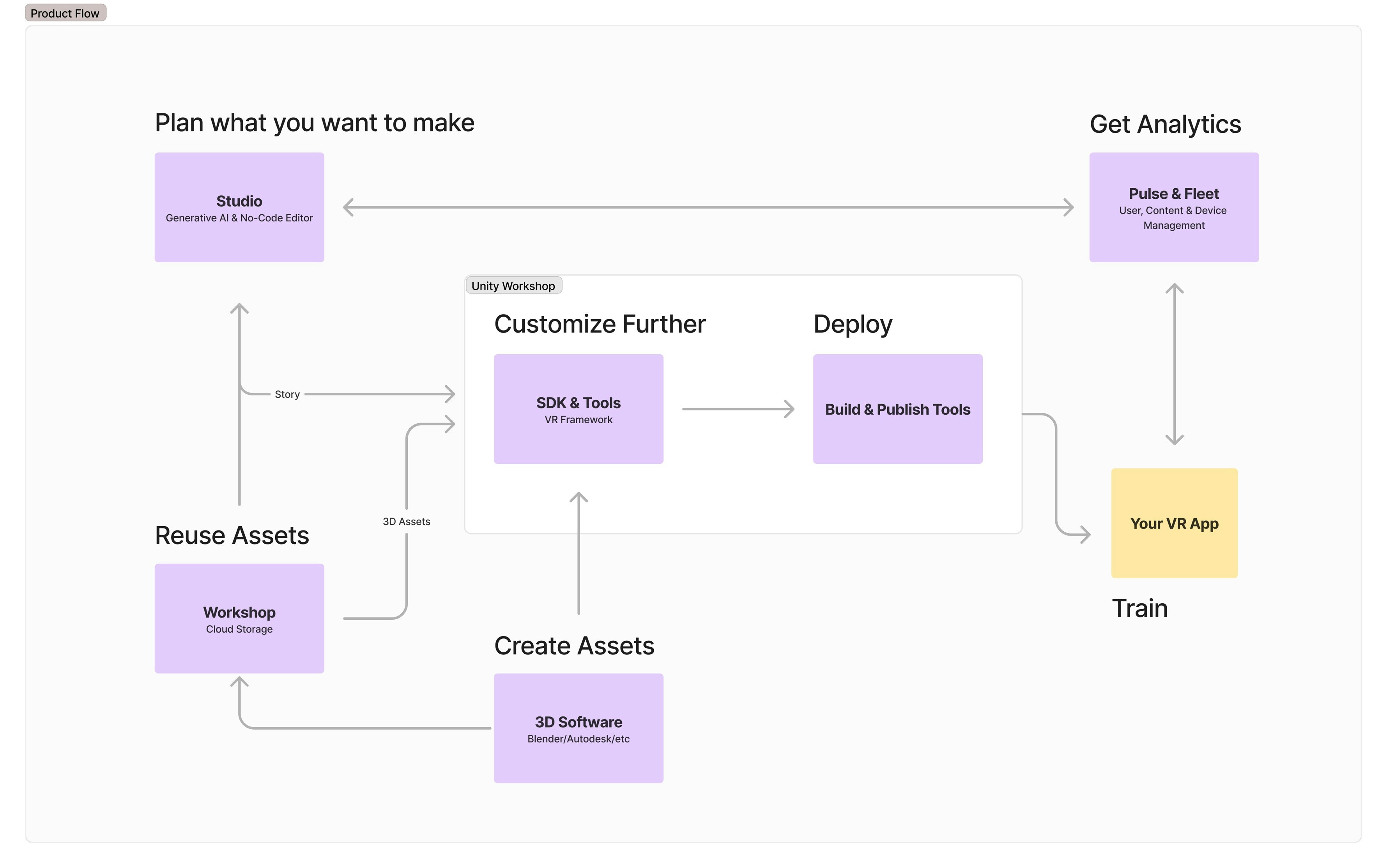
Plan what you want to make with Studio
Use the AI-powered generator to create and edit the story that you want to see in VR
2
Pick 3D Assets from Infinity Workshop
Select 3D assets from our library which offers a wide variety of industrial models, or bring your own
3
Use the Unity SDK to finetune your story
Use the SDK to compile all assets and story, finetune, and add more advanced or custom interactions
4
Build and publish to a platform of your choice
Use the tooling to easily build (an apk) and publish your story to Meta Quest Store or any other platform of your choice
5
Collect insights from your users on the Pulse Dashboard
Your app gets connected to the dashboard, create users for your application and start collecting valuable insights
Essentials
Explore VRseBuilder’s design system, workflow, and setup.Design System
Get familiar with the basics
Workflow
A recommended pipeline for using the suite
Setup
Learn how to install various components of the suite