

VPN/Firewalls
Coming SoonSource Control
It is important to understand some important context before we take a source control decision. As explained in the Introduction document, VRse Builder is a suite of tools, the part that will require source control will be the VR content itself, that lives in Unity. To explain the Unity project, take a look at the diagram below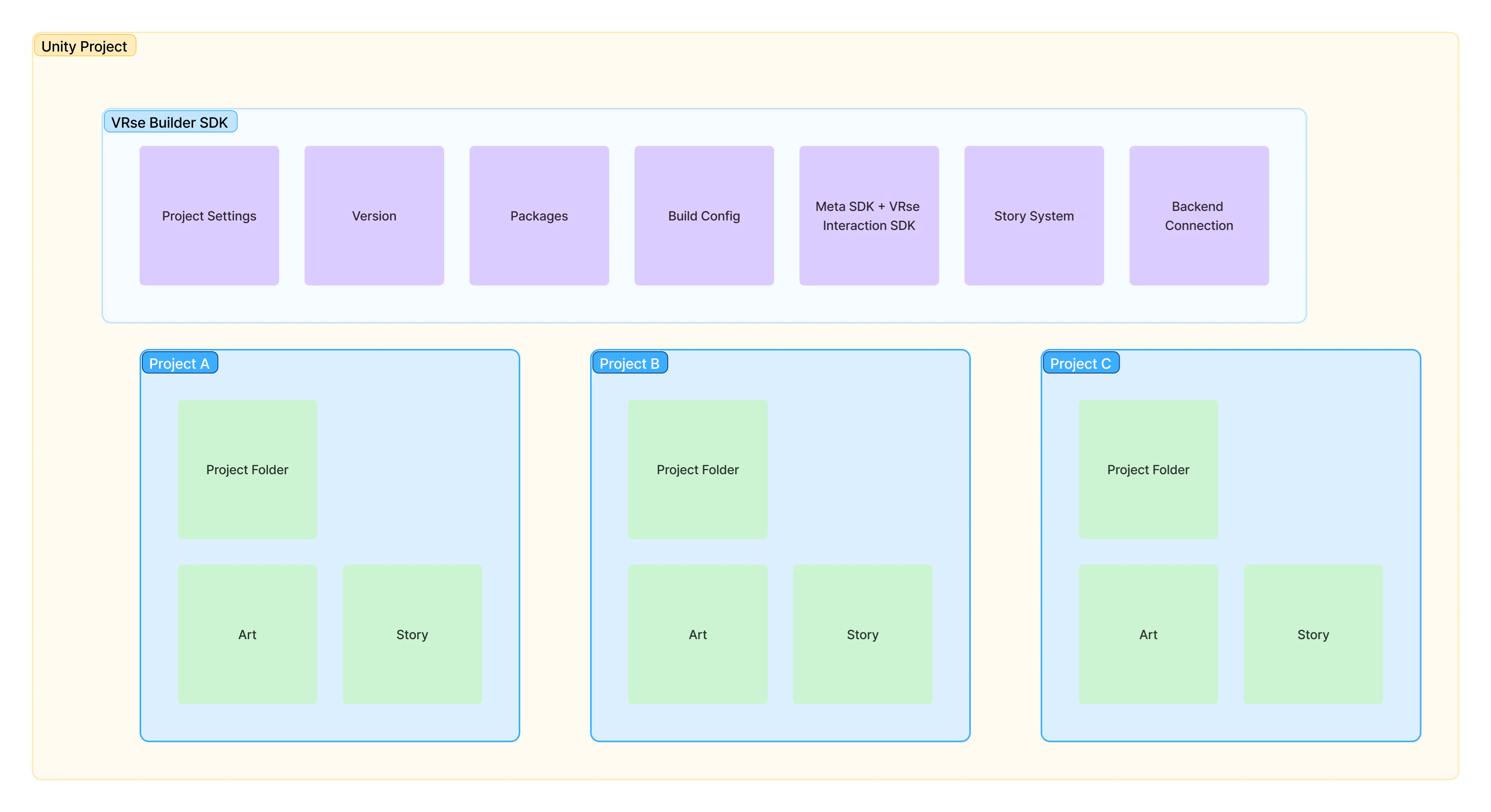
-
Git + Git Large File Storage (LFS):
- Git is a popular distributed version control system that tracks changes to your files.
- Large File Storage (LFS) is an extension that handles large assets (e.g., textures, audio, and models) by storing them in a separate location, keeping your core repository lightweight.
- This approach ensures quick pulls/pushes for code, while preventing huge binary files from ballooning the main repository size.
-
PlasticSCM (Built-in Integration with Unity):
- Unity offers a native integration with PlasticSCM, which allows you to manage version control directly from the Unity Editor.
- PlasticSCM is designed specifically for game development and large binary assets.
- If you prefer a more visual/graphical approach and minimal setup effort, PlasticSCM might be the simplest option.
Tip: Check out Unity’s own documentation for how to set up and use these tools with your project: Version Control for Unity Projects
What we do at AutoVRse
At AutoVRse we use Git LFS approach to solve our source control needs, this is reasonably easy to use and cost effective as well. The Guidelines-
There exists one main repository for the Unity SDK, this helps us control versioning for our framework, any change in versions should be pushed via this repository only.
- Every time there is an update on the main repository, an update is pushed
- Whoever are on the main branch can directly pull, if you are on a separate branch, you can rebase your branch to the latest main
-
Each project has its own project repository, which lives as folder of the main repository.
- The same folder is also ‘git ignored’ by the main repository
- Anyone working on projects shall contribute to the project repository
- Anyone maintaining the SDK versioning or custom feature implementation should work on the main repository
- We also use ‘Git-Flow’ to facilitate our day to day git ops